 CartVisual
Product images / DECISION CHECK
Does a 100% white-edge score prove the whole product background is pure white?
No. A white-edge score measures only the sampled edge. Background inside a handle, loop or headband can remain off-white while every sampled outer pixel is white. Inspect those regions separately and distinguish background color from product-shape fidelity.
What our actual test measured
On October 9–10, 2026, we generated a 1254 × 1254 headphone packshot through a local CartVisual candidate using a project-owned demonstration reference. The original had a near-white, paper-like background. The website’s twelve-pixel edge sample reported 10.7% pure white. After its near-white correction, 657,642 pixels were changed and the sampled edge reported 100.0% pure white.
The downloaded corrected PNG still showed near-white texture in the closed area inside the headband. We therefore did not mark the entire background as strictly pure white. This is one actual local test, not a production-wide success rate, a customer result or evidence that a marketplace accepted the image.
The denominator in this archived example is 59,616 sampled pixels: the 1254 × 1254 canvas minus its 1230 × 1230 interior. The original has 6,385 exactly opaque-white samples, or about 10.7%; the corrected file has 59,616, or 100.0%. The 657,642 changed pixels count the full-image difference, not the edge-score denominator. These describe the retained files, not a new generation or a new marketplace test.
The current perimeter check derives its band from one percent of the shorter image side, rounded down with a minimum of one pixel; this image therefore uses 12 pixels. Do not describe every future upload as a fixed twelve-pixel test. Neither the band count nor the whole-image change count identifies which changed pixels were truly background.
Compare the actual files
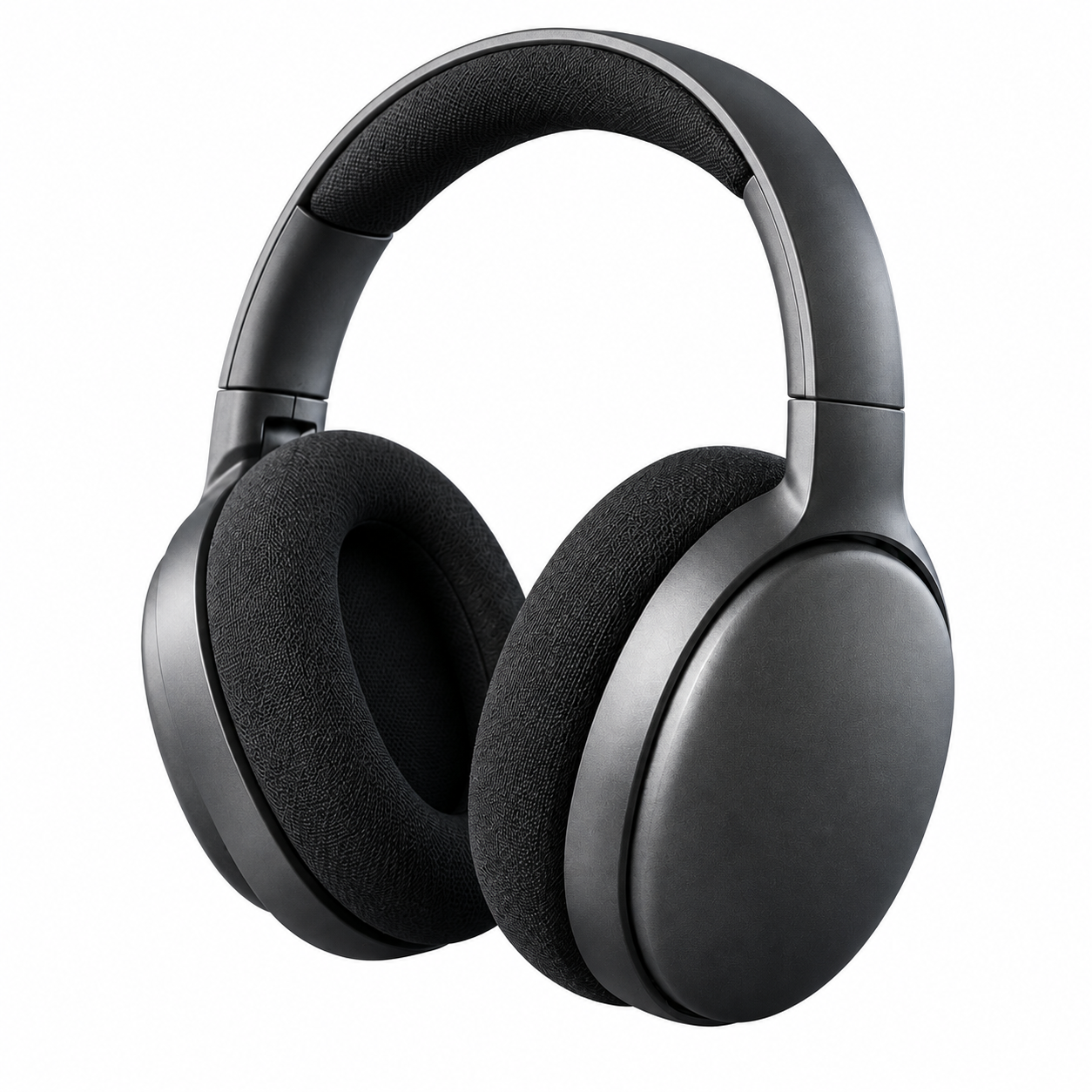
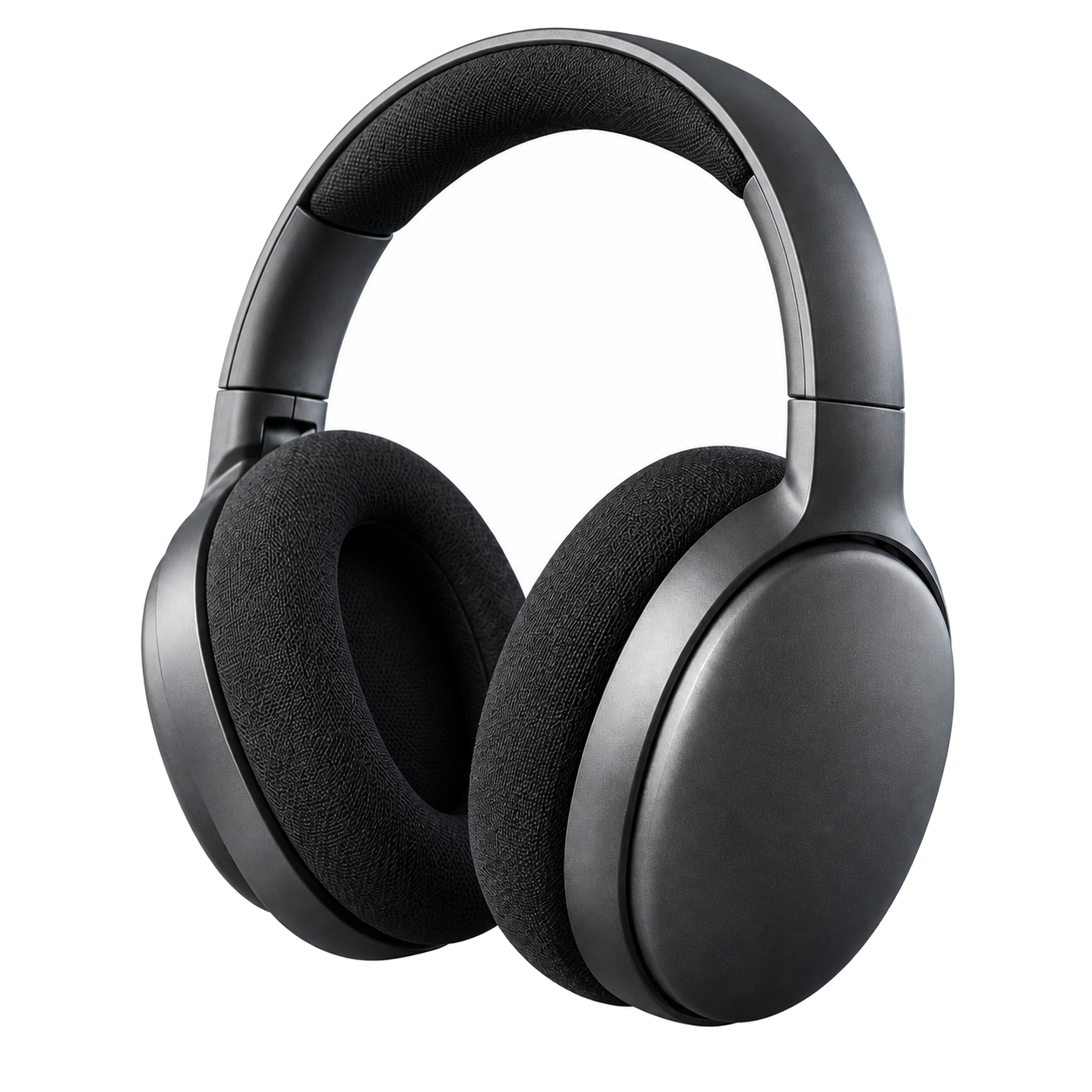
Name the region behind each metric
| Region | What to check | What the edge score establishes |
|---|---|---|
| Outer sampled band | Pixel colors in that band | Only the sampled perimeter |
| Inside headband or handle | Background separated from product | Nothing without an additional inspection |
| Contact shadow | Intended shadow policy | Not automatically an unwanted background |
| White product areas | Actual merchandise shading | Must not be erased to raise a score |
Do not turn every near-white pixel into white to manufacture a passing number. That can erase white product surfaces, reflections or useful edge information. A product/background mask needs its own accuracy review.
Use a scoped approval statement
A truthful record for this test says: outer sampled band passed after correction; closed headband background still needs review; product identity and destination rules checked separately. For your own image, identify all holes and enclosed spaces before approving a strict background. A higher percentage alone does not tell you whether the correction damaged the merchandise.
CartVisual’s tested correction was not a complete semantic cutout. The general lesson is to describe what a metric measured and inspect what it omitted. A marketplace or customer may have different background requirements; follow the actual destination rather than treating this case as a universal rule.
Current CartVisual correction controls include an outer near-white correction and selection of an enclosed near-white region by point or source-pixel coordinates, with comparison and undo. This historical outer-only result does not mean the current interface lacks that additional step. The operation still follows a selected near-white region; it is not semantic product/background segmentation and does not certify a safe selection on white merchandise.
For a new file, identify each genuinely background opening before making a local correction, compare the result with the preserved original, and reject changes to merchandise. If the boundary is uncertain, continue in an appropriate reviewed cutout workflow. Use white-product boundary review to protect actual shading. A region-specific record is more useful than raising a number while leaving an uninspected hole.
Sources and further reading
Recorded source-review dates are listed individually below. An undated source does not inherit the article’s publication date. Software and platform rules can change; check the current original before acting.
- CartVisual: editorial scope and evidence policy · Review date not separately recorded
- Photoroom: realism and product fidelity review · Reviewed
Frequently asked questions
What does 100% mean in this test?
Only that the sampled twelve-pixel edge band was pure white after correction.
Did this image pass complete strict-white inspection?
No. The closed headband region still showed near-white texture.
Can I whiten the entire image?
That risks damaging product surfaces; separate background and merchandise before correction.
PREPARE ASSETS FOR YOUR NEXT STEP
Create supporting product assets in CartVisual.
Create new product creative assets in the workspace, then continue in your chosen tools. Third-party software procedures described in this guide take place in those applications; this workspace link does not imply an integration. Check current capabilities, account access and credit quotes.
Explore asset creation tools Check pricing and credits