 CartVisual
DIAGNOSTIC GUIDE / Packaging studio
What should a drawer-box concept show about the actual opening direction?
Show where the actual drawer moves and how a person starts that movement. Obtain the supplier’s structural information and a real sample before using arrows, tabs or finger cutouts in a packaging concept. A beautiful closed box does not establish an opening mechanism. Test the agreed sample without coaching and record first actions, while keeping the concept separate from a production dieline.
Map the movement on the real box
Identify the fixed sleeve, moving drawer, opening side and actual grip. Photograph closed and partly open states from understandable views. Do not draw a handle where the supplied structure has none or imply an opening side that the sample does not permit.
Record constraints from the supplier, including any required orientation or assembly information. A decorative panel can resemble a pull tab while having no functional role. Keep functional and visual elements on different notes so the designer does not turn a graphic into an unsupported mechanical instruction.
Observe an uncoached opening attempt
Give an approved sample to a reviewer who has not heard the opening explanation. Ask them to open it normally, then record where they look, where they grip and what first movement they try. Do not score the test by how quickly they follow your instructions.
If the wrong edge attracts attention, inspect the relation between graphic emphasis and actual grip. A small directional cue may help, but it needs supplier and reader review. Do not redesign the structure in a raster mockup and claim that the printed box has become easier to open.
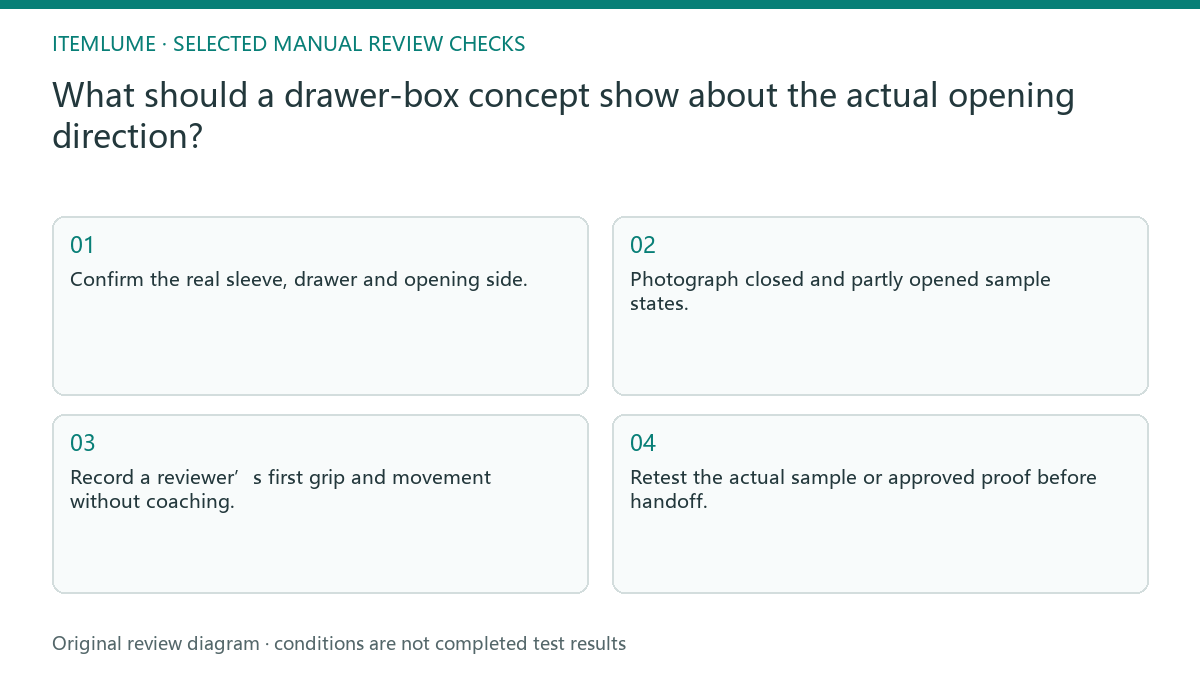
- Confirm the real sleeve, drawer and opening side.
- Photograph closed and partly opened sample states.
- Record a reviewer’s first grip and movement without coaching.
- Revise a specific cue while preserving confirmed structure.
- Retest the actual sample or approved proof before handoff.
Retain the first action and the sample state
Use a short observation card: sample/dieline revision, starting orientation, closed or partly open state, visible cue, first grip, attempted movement, and any assistance given. Ask “Please open this package as you normally would” without pointing to the grip or naming the intended direction. Record what happened before explaining.
A fictional entry could be “closed sample v2; front facing reviewer; first grip on fixed sleeve; drawer not moved before help.” This is an invented observation format, not a measured failure or usability rate. After revising the graphic, use a reviewer who has not been taught the mechanism and record the new sample revision.
Describe movement relative to the actual sleeve, drawer and viewing side. A rightward screen arrow can become misleading after the box is turned or an image is mirrored. Recheck the cue on the physical sample in the intended handling orientation; do not add a notch, pull tab or structural motion that the approved sample lacks.
Fictional exercise: artwork points to the fixed sleeve
This fictional exercise uses a drawer box whose artwork emphasizes the fixed sleeve edge. An uncoached reviewer pulls that edge rather than the actual drawer. The observation is invented and is not a completed manufacturing test or a claim about a real package.
The team moves only the misleading visual cue and preserves the supplier-confirmed structure. They test the revised proof on the agreed sample. If the opening direction remains unclear, they hold the concept or ask the supplier about structural changes rather than drawing a fictitious finger notch.
Approve the guidance at real scale
Keep the structural reference, grip observations and approved visual revision together. Inspect the physical size and orientation at the intended use, not only a large mockup. A cue visible on a presentation screen may not be recognizable on the actual box. If the product is presented from the opposite side, verify that any direction cue remains correct. A mirrored presentation image can reverse a useful arrow while leaving the apparent box shape convincing.
Stop when the agreed sample supports the displayed opening path and the recipient understands the production scope. CartVisual packaging generation is a concept workflow, not supplier-approved engineering or a validated dieline. Any structural change requires the appropriate supplier review rather than inheriting the visual concept’s approval.
Drawer-opening cue check
| Observation | Manual check | Stop or approve |
|---|---|---|
| Fixed sleeve emphasized | Observe first grip | Avoid false pull cue |
| Real grip not visible | Check sample view | Show supported opening |
| Invented notch | Compare supplier structure | Hold unsupported detail |
| Small printed cue | Review actual scale | Approve readable guidance |
Use this matrix as a manual review record and add your own real evidence. Its conditions are not completed test results.
Sources and further reading
Recorded source-review dates are listed individually below. An undated source does not inherit the article’s publication date. Software and platform rules can change; check the current original before acting.
- CartVisual: editorial policy and product scope · Review date not separately recorded
- Product photography tips(Adobe Express) · Reviewed
Frequently asked questions
Can I add a pull tab in the image?
Only as an explicitly unapproved structural proposal until the supplier validates it; do not present it as existing.
Does an opening arrow prove usability?
No. Observe the real sample and intended user action separately.
Is the generated box a dieline?
No. Production structure and visual concepts are separate deliverables.
PREPARE ASSETS FOR YOUR NEXT STEP
Create supporting product assets in CartVisual.
Create new product creative assets in the workspace, then continue in your chosen tools. Third-party software procedures described in this guide take place in those applications; this workspace link does not imply an integration. Check current capabilities, account access and credit quotes.
Explore asset creation tools Check pricing and credits