 CartVisual
DIAGNOSTIC GUIDE / Image remix
How should a presale creative separate the deposit, balance and total price?
Separate the deposit, later balance and complete purchase amount in the creative. A prominent small deposit can be mistaken for the item’s price when the remaining payment is unclear. Use the seller’s actual order terms and keep payment stages distinct from production or dispatch timing. A buyer should identify the complete amount and remaining payment action without guessing.
The deposit headline can hide the total price
“Pay now” can refer to the current payment stage rather than the whole transaction. A screenshot or another seller’s presale example does not establish your conditions. Qualification, deadline and balance route may matter as much as arithmetic, so the price card must explain what each amount is for.
Treat deposit, required balance and full price as three labeled fields. Specify the currency and any confirmed qualification or date. Production start and dispatch are separate events; a buyer paying a deposit should not infer either immediate shipment or a complete purchase.
Match each amount to its payment stage
Use the approved order terms to fill the payment-stage table below: exact item and quantity, deposit, required balance, complete amount, currency, dates and eligibility. Compare those fields with the intended order page without placing an order. Then ask a reviewer to name the complete purchase amount and what payment remains. If the artwork suggests a different answer, revise it before approval.
Keep payment timing separate from availability and dispatch promises. If a price depends on a coupon or other qualification, use conditional-price review; do not silently combine a confirmed deposit with an unconfirmed discounted balance.
A fictional 10 plus 40 payment example
Fictional exercise: one desk organizer has a product amount of 50 units, paid in two stages: deposit 10, then balance 40. Label the currency and both stages using the merchant’s confirmed terms in a real campaign. These teaching numbers are not a live offer, a deposit-multiplier promotion or a marketplace payment rule. Do not add shipping, tax or refund conditions that the example has not supplied.
Show paid-to-date separately from the full purchase amount
After the fictional deposit is recorded as paid, show the reconciliation: product amount 50 − paid-to-date 10 = remaining product balance 40. “Total 50” does not mean another 50 on top of the paid 10. Before payment, label the 10 as due at the deposit stage rather than already paid. Keep any confirmed extra charges separate so the stated product amount is not mistaken for an all-in order total.
| Field after the example deposit | Amount | Merchant must confirm |
|---|---|---|
| Deposit already paid | 10 | Recorded payment and qualifying order |
| Remaining product balance | 40 | Actual payment route and deadline/timezone |
| Complete product amount | 50 | Item, included quantity/components and separate charges |
One public buyer asks how deposit and later payments work. Another discussion concerns balance/full-payment links and an accessory question. These are observed questions, not verified merchant terms, a frequency estimate or a universal payment/refund procedure. Obtain the real order terms instead of treating a commenter’s suggested route as policy.
Resolve the final amount before publishing
Keep the price creative unapproved if the complete amount, required balance, eligibility or deadline is unresolved. When a term changes, compare the artwork and intended order page again; changing only one leaves a conflicting promise. The seller must confirm transaction terms and the applicable platform payment route. CartVisual can draft the explanation; it does not establish order rules or certify a promotion’s legality.
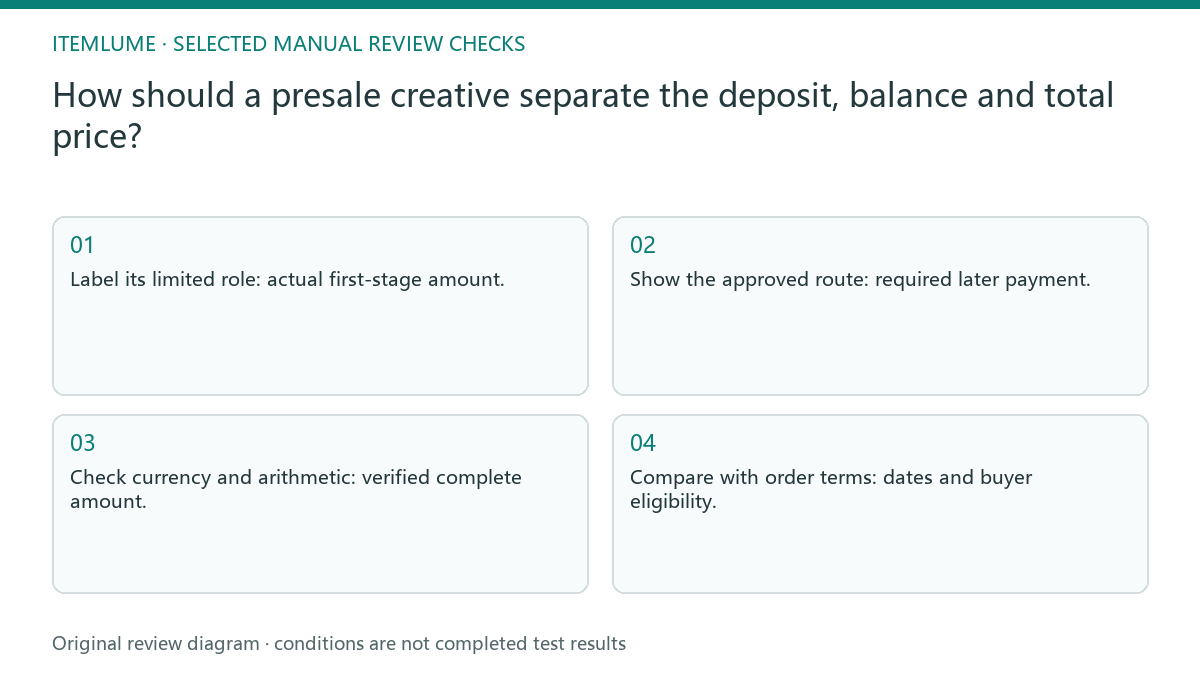
Deposit to conditions: decision worksheet
| Check | Evidence to record | Review action |
|---|---|---|
| Deposit | Actual first-stage amount | Label its limited role |
| Balance | Required later payment | Show the approved route |
| Total | Verified complete amount | Check currency and arithmetic |
| Conditions | Dates and buyer eligibility | Compare with order terms |
Use this matrix as a manual review record and add your own real evidence. Its conditions are not completed test results.
Sources and further reading
Recorded source-review dates are listed individually below. An undated source does not inherit the article’s publication date. Software and platform rules can change; check the current original before acting.
- CartVisual: editorial policy and product scope · Review date not separately recorded
- 淘宝定金与后续付款疑问(公开用户帖) · Reviewed
- 淘宝尾款链接与套装包含项疑问(公开用户帖) · Reviewed
Frequently asked questions
Can I show only the deposit as the price?
That risks an incomplete price promise. Label the necessary balance and total using actual terms.
Does a deposit mean immediate dispatch?
Not inherently. State confirmed payment, production and dispatch events separately.
Are 10, 40 and 50 real promotion figures?
No. They are explicitly fictional teaching values, not an actual offer.
PREPARE ASSETS FOR YOUR NEXT STEP
Create supporting product assets in CartVisual.
Create new product creative assets in the workspace, then continue in your chosen tools. Third-party software procedures described in this guide take place in those applications; this workspace link does not imply an integration. Check current capabilities, account access and credit quotes.
Explore asset creation tools Check pricing and credits