 CartVisual
DIAGNOSTIC GUIDE / A+ product pages
How do I distinguish whole-bean and ground coffee without implying universal preparation compatibility?
Identical coffee packaging can hide a difference between whole beans and ground coffee. Record the offered form and any verified grind option before preparing imagery or copy. A package photograph alone does not establish which equipment or method is suitable. Use the supplier’s actual preparation guidance and make clear whether the buyer needs a grinder or a documented option.
Identify the sellable form for each SKU
Ask the merchant whether the offer is whole bean, a fixed ground form, or a selectable documented grind option. Keep that field separate from roast, flavor description, and package weight. Similar front labels can make the forms easy to confuse, so the listing needs an explicit identity record.
Compare product selection, image content, and copy together. A whole-bean photograph beside a pre-ground offer can mislead even if the package itself matches. Do not reuse a content close-up across forms simply because both products share the same bag or brand.
Use preparation guidance without inventing compatibility
Obtain the supplier’s instructions for the actual form or grind option. Do not infer a universal preparation list from a generic coffee illustration. A grinder shown in the scene can imply an additional step; a brewer can imply compatibility. Verify why each piece of equipment appears.
If the seller cannot confirm a method, leave it unverified rather than adding every popular brewing device to the copy. Distinguish equipment the customer needs from props that are not included. This guide does not prescribe grind measurements, recipe ratios, or a guarantee of beverage quality.
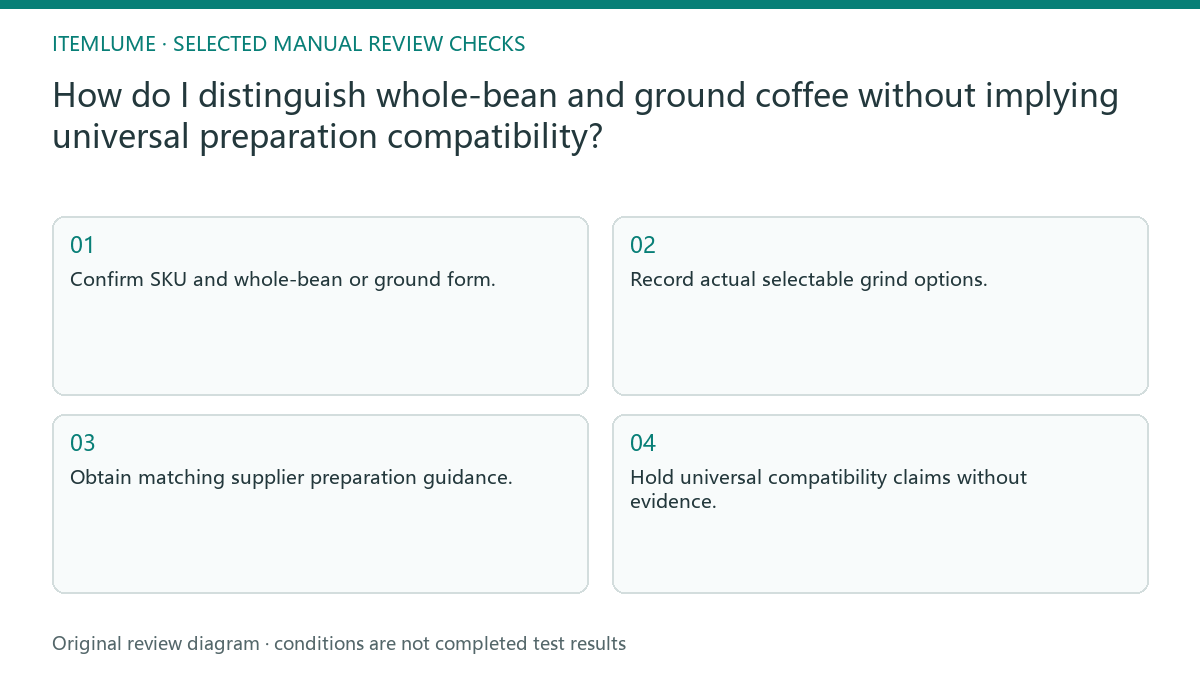
- Confirm SKU and whole-bean or ground form.
- Record actual selectable grind options.
- Obtain matching supplier preparation guidance.
- Check equipment imagery and included-item facts.
- Hold universal compatibility claims without evidence.
A fictional paired coffee offer
Fictional exercise: two offers share one bag design. SKU WB is whole bean; SKU GR is pre-ground. The seller has supplied a WB whole-bean record and a GR ground-form record, but has not supplied a documented device-compatibility list. No coffee was brewed or equipment tested.
| Offer | Evidence-bound copy | Hold |
|---|---|---|
| WB: whole bean | “Whole-bean coffee. Grind for your chosen brewing method following the supplier’s instructions.” Use only when those instructions actually exist. | “Espresso-ready for every machine” inferred from the roast name. |
| GR: ground | “Ground coffee.” Add the named grind option and documented methods only after the matching GR record arrives. | A whole-bean contents photograph or an invented universal brewing list. |
| Equipment in the scene | Record whether the device is required, optional, or a prop; separately verify what the buyer receives. | A device pictured beside the bag treated as compatibility evidence or an included item. |
A public example of this distinction is Starbucks Espresso Roast whole bean: its preparation section calls for grinding for the chosen brewing method. This is a specific brand’s format example, not instructions for the fictional SKUs or proof that all espresso-labelled coffee is ground.
If the required form-specific record is missing, stop that method claim and keep the known form visible. An attractive morning scene does not settle brewing compatibility. For another field that packaging appearance cannot establish, see package shape versus net quantity.
Keep selection and downstream assets aligned
Record which visual belongs to each SKU and option. When the customer changes the selected form, the operator should verify the displayed content and copy in the actual shop workflow. A shared package hero may remain useful, but a form-specific content image needs the corresponding selection.
CartVisual helps prepare creative assets and verified text; it does not connect to shop variants or determine brewing compatibility. Merchant documentation and suitable real testing remain separate evidence. Do not advertise universal preparation from package similarity, and do not claim that a fictional exercise proves the coffee works with a particular device.
Coffee form and preparation record
| Field | Evidence | Customer-facing distinction |
|---|---|---|
| Whole beans | Exact SKU record and contents image | Grinding need stated when documented |
| Ground form | Actual form reference | Not represented as beans |
| Selectable option | Merchant option list | Correct option named |
| Preparation method | Matching supplier instructions | No universal device promise |
Use this matrix as a manual review record and add your own real evidence. Its conditions are not completed test results.
Sources and further reading
Recorded source-review dates are listed individually below. An undated source does not inherit the article’s publication date. Software and platform rules can change; check the current original before acting.
- CartVisual: editorial policy and product scope · Review date not separately recorded
- Photoroom: How to make AI product images look real · Review date not separately recorded
- Starbucks at Home: Espresso Roast whole-bean product and preparation · Reviewed
Frequently asked questions
Can identical bags use identical content photos?
Only if the actual sold contents match. Whole beans and grounds need accurate form-specific representation.
Can AI infer grind suitability?
No. Use the supplier’s real option and preparation guidance rather than a generic compatibility list.
Does a brewer in the scene prove compatibility?
No. Its appearance can imply a claim, so verify the intended relationship before using it.
PREPARE ASSETS FOR YOUR NEXT STEP
Create supporting product assets in CartVisual.
Create new product creative assets in the workspace, then continue in your chosen tools. Third-party software procedures described in this guide take place in those applications; this workspace link does not imply an integration. Check current capabilities, account access and credit quotes.
Explore asset creation tools Check pricing and credits