 CartVisual
DIAGNOSTIC GUIDE / A+ product pages
Can AI infer a product's scent from the props in its photograph?
Do not adopt a scent claim merely because AI recognized wooden props, flowers or fruit in a scene. A photograph can suggest an atmosphere but cannot establish how the product smells. Use the owner-approved scent description and keep visual associations separate. If the only evidence is a staged photograph, remove the inferred fragrance claim until the real product record is supplied.
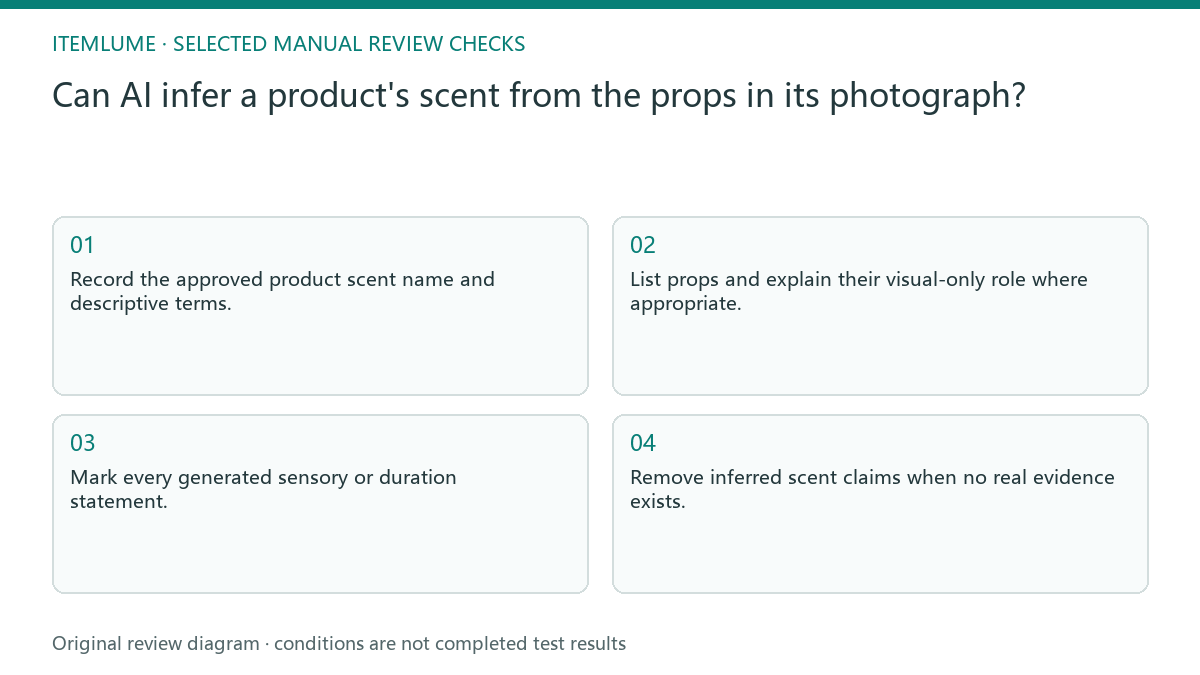
Separate scent facts from scene associations
Record the exact product and the approved wording from its responsible owner or supplier. Keep fragrance name, verified descriptive terms and unsupported associations in different fields. A prop may be chosen for color or styling without representing an ingredient or scent note.
Do not replace the product’s approved name with a model’s more elaborate description. “Woodland mood” as a scene brief is not the same as “woody fragrance” as a product claim. The difference should remain visible in both input and generated text.
Constrain the draft to approved sensory wording
Supply the allowed scent terms and state that scene props are visual only unless separately confirmed. Inspect every sensory adjective in the output. Check blends, intensity, duration and ingredient associations rather than only confirming the main fragrance name.
If an appealing phrase has no source, either remove it or return it for the owner’s review. Do not add a persistence, calming or health-related claim to make the paragraph complete. The copy task is to communicate established product information, not predict sensory performance from pixels.
- Record the approved product scent name and descriptive terms.
- List props and explain their visual-only role where appropriate.
- Mark every generated sensory or duration statement.
- Trace each accepted term to the owner-approved record.
- Remove inferred scent claims when no real evidence exists.
Fictional exercise: wooden props create a woody claim
In this fictional exercise, a candle’s approved record names a citrus fragrance, while its staged photograph includes a wooden tray. A draft calls it woody. The scenario is invented and does not report an actual generation result, scent evaluation or ingredient analysis.
The reviewer restores the approved citrus wording and leaves the tray as a visual styling choice. They also inspect the picture for an unintended ingredient implication. If the real fragrance record remains unavailable, the copy avoids naming a scent rather than guessing from the props.
Keep scent notes, ingredients and performance claims in separate rows
For the fictional citrus candle, an approved scent name can support that name in a draft. It does not by itself establish citrus-oil ingredients, a burn-time promise, a calming effect or a stronger fragrance concentration. A visual citrus prop is not a composition report, and a wooden tray is not evidence of a woody note.
| Draft statement | Needed record | If absent |
|---|---|---|
| Named scent or descriptive note | Current owner-approved wording for this SKU | Do not infer it from the scene |
| Ingredient | Actual applicable formulation/label evidence | Do not convert a note into an ingredient |
| Intensity or duration | Support for that specific statement and conditions | Omit the added performance claim |
| Scene mood | Styling role and whole-image review | Revise if it implies an unsupported product fact |
A proposed limited rewrite is “Citrus fragrance,” only where that exact claim is confirmed. Keep “woodland mood” in the styling brief rather than silently adding it to the product description. Recheck the final caption and image together after any formulation or prop change.
Approve scent copy without claiming sensory testing
Save the source terms, removed inferences and final wording together. A later scene change may suggest another association, so recheck captions and nearby imagery. Product formulation or scent naming changes require updated owner information even if the same container remains in use. Review captions added after the image is approved. A neutral scene can acquire an unsupported fragrance implication from a newly added heading even when the product picture itself remains unchanged.
Stop when the copy’s sensory terms match the approved record, with unknown claims excluded. CartVisual writing assistance is not a fragrance test or formulation check. Do not claim that a manual wording review proves smell, ingredient composition or the experience of every customer.
Scent-source separation
| Observation | Manual check | Stop or approve |
|---|---|---|
| Approved scent term | Record owner source | Eligible for factual draft |
| Wood or flower prop | Identify styling role | No automatic scent claim |
| Duration adjective | Seek separate support | Hold unsupported term |
| New formulation | Refresh product record | Renew wording review |
Use this matrix as a manual review record and add your own real evidence. Its conditions are not completed test results.
Sources and further reading
Recorded source-review dates are listed individually below. An undated source does not inherit the article’s publication date. Software and platform rules can change; check the current original before acting.
- CartVisual: editorial policy and product scope · Review date not separately recorded
- 商品信息发布规范(抖音电商学习中心官方索引) · Review date not separately recorded
- Product photography tips(Adobe Express) · Reviewed
Frequently asked questions
Can a model smell from a photograph?
The image does not establish the product’s scent; use actual approved information.
Can the scene still use wood?
Yes as a supported styling decision, but review whether the combined image and copy imply an unverified scent.
Should I ask for stronger adjectives?
First confirm the factual terms; vivid language must not add unsupported intensity or duration.
PREPARE ASSETS FOR YOUR NEXT STEP
Create supporting product assets in CartVisual.
Create new product creative assets in the workspace, then continue in your chosen tools. Third-party software procedures described in this guide take place in those applications; this workspace link does not imply an integration. Check current capabilities, account access and credit quotes.
Explore asset creation tools Check pricing and credits