 CartVisual
DIAGNOSTIC GUIDE / A+ product pages
How should copy explain a sample fee credited against a later wholesale order?
Explain whether the sample payment is a refund, a credit against a qualifying order, or another arrangement. Use the supplier’s actual approved terms and keep the qualification beside the advertised benefit. “Sample fee returned” can imply cash repayment when the real offer is an order credit. AI can clarify known conditions, but cannot create a refund policy or guarantee a future wholesale order qualifies.
Record the two transactions independently
Give the sample order and possible production order separate identities. Record who paid, what the sample fee covered and what later order can receive the credit. Do not assume the person ordering samples and the company placing production are automatically interchangeable.
Ask the offer owner for any approved quantity, deadline, design or account conditions and the credit amount. Keep unconfirmed fields open. The statement should trace to a current agreement rather than another supplier’s advertisement or a sales conversation remembered only in summary.
Use wording that matches the actual benefit
A credit reduces a specified later charge; a refund returns money under its conditions. State which arrangement exists instead of choosing the more attractive verb. If only part of the sample fee qualifies, do not let the image suggest the whole payment is returned.
Keep scope and qualification close to “credited” in the creative. Check the description and quotation as well as the artwork. If the supplier has not approved a condition, pause the offer-led copy rather than allowing AI to complete it with a conventional-looking minimum order.
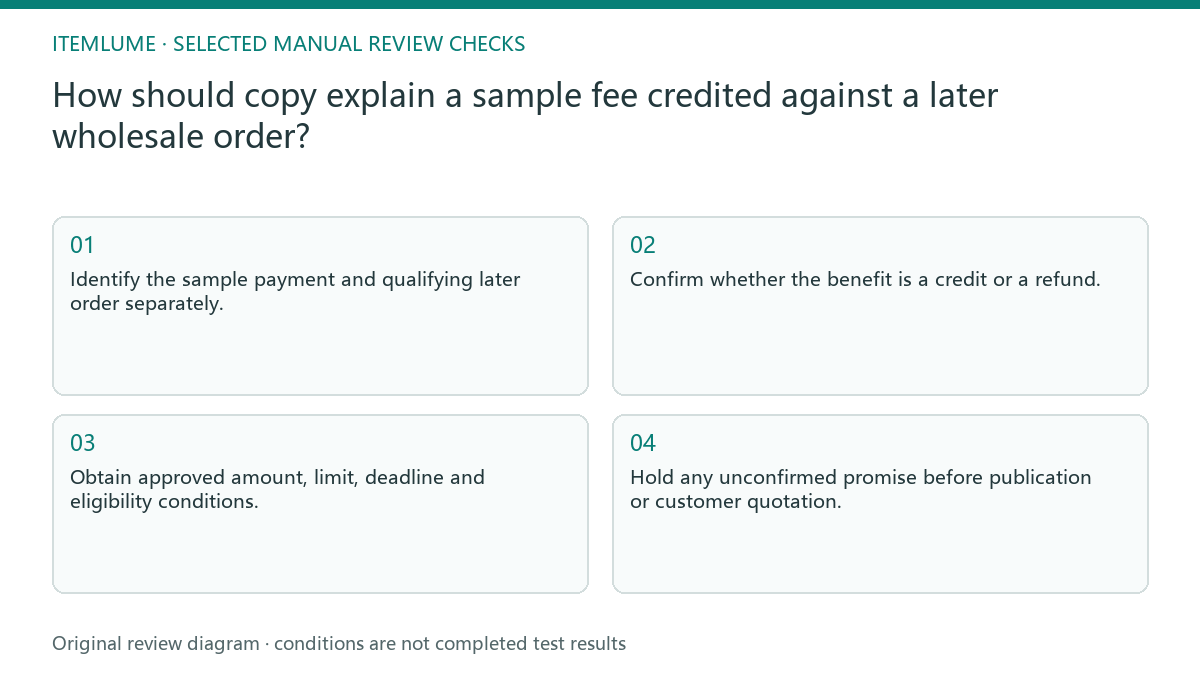
- Identify the sample payment and qualifying later order separately.
- Confirm whether the benefit is a credit or a refund.
- Obtain approved amount, limit, deadline and eligibility conditions.
- Compare the benefit headline with the actual quotation.
- Hold any unconfirmed promise before publication or customer quotation.
Fictional exercise: partial credit looks like a refund
Fictional wording exercise only: the sample invoice is US$60 and the supplied offer permits US$40 credit against one qualifying production order. A precise draft is “US$40 of the US$60 sample fee can be credited against one qualifying production order under the approved offer terms.” The remaining US$20 is not covered by this credit; that fact alone does not establish a separate refund right or forfeiture rule. Do not add a deadline, minimum order or cash-refund promise absent from the owner-approved terms.
FTC U.S. advertising guidance considers what the benefit and its qualifications convey together. For the actual offer, obtain the currency, eligible order/account, amount, applicable charges and any supplied conditions from the responsible owner. A clear sentence is an editorial proposal, not an issued quotation, accounting entry or legal determination that a buyer qualifies. Remove “sample fee refunded” if the only confirmed benefit is the stated future-order credit.
Maintain offer and asset versions together
Keep the current terms with the approved headline and file. If a supplier changes qualification, the existing static artwork may become misleading even when its image remains attractive. Recheck the credit when issuing a real quotation, not only when producing the first visual. Check the same benefit wording in direct sales messages. A correctly qualified poster can still be contradicted by a separate message promising a cash refund, so retain the approved distinction during handoff.
Stop when every advertised payment benefit matches the actual offer, or remove it from publication. Quotation issuance and accounting are external merchant responsibilities. CartVisual writing does not confirm eligibility, apply credits, refund payments or connect a supplier’s order system.
Sample-credit conditions
| Observation | Manual check | Stop or approve |
|---|---|---|
| Sample payment | Record exact included cost | Do not assume all refundable |
| Credit or refund | Check approved action | Use correct verb |
| Qualifying order | Confirm real conditions | No invented threshold |
| Terms changed | Recheck old artwork | Update or withdraw |
Use this matrix as a manual review record and add your own real evidence. Its conditions are not completed test results.
Sources and further reading
Recorded source-review dates are listed individually below. An undated source does not inherit the article’s publication date. Software and platform rules can change; check the current original before acting.
- CartVisual: editorial policy and product scope · Review date not separately recorded
- FTC: Advertising FAQs for small business · Reviewed
Frequently asked questions
Can I call a credit a refund?
Use “refund” only when the actual approved arrangement returns money. A future-order credit and a cash refund have different effects and must not be interchangeable in the headline. This copy review does not determine legal repayment rights.
Should AI choose a minimum order?
No. It must come from the owner-approved offer, or remain unconfirmed.
Does this table execute the credit?
No. It is a manual review record, not an accounting or supplier integration.
PREPARE ASSETS FOR YOUR NEXT STEP
Create supporting product assets in CartVisual.
Create new product creative assets in the workspace, then continue in your chosen tools. Third-party software procedures described in this guide take place in those applications; this workspace link does not imply an integration. Check current capabilities, account access and credit quotes.
Explore asset creation tools Check pricing and credits